Guide · Passport cluster · Reasons & fixes
Why passport photos get rejected
Issuing offices reject photos for size, pose, background, lighting, and “looks edited” problems — not only because the face is hard to recognize. Here’s a plain checklist of common failure modes, what you can fix with a better source photo, and how Fogkits helps you preview size and background before you spend a credit.
- Checklist of common rejection reasons
- Retake vs edit — honesty first
- Free watermarked preview · HD = 1 credit
Free watermarked preview; optional HD uses 1 credit. Background-only cutout? Try Remove Background.
Quick answer
Rejected for technical checks — not only “bad likeness”
Passport photos get rejected when they fail the issuing office’s technical checks — not only when the face is hard to recognize. Typical failures include the wrong head size or crop, a busy or shadowed background, uneven lighting, a tilted face, glasses glare, blur, and photos that look filtered or digitally altered.
For U.S. passports, the Department of State states that unacceptable photos are the number one reason applications are put on hold. UK guidance warns that your application will be delayed if photos do not meet the rules. The fastest honest fix is usually a new source photo: even light, camera at eye level, plain wall, original camera file — then re-check size and background before you resubmit.
Why offices reject photos (not just “bad likeness”)
A passport or visa photo is an identity document, not a social portrait. Offices and upload checkers look for correct framing, a plain background, even light, a front-facing pose, and an original-looking capture — so a photo that looks “fine” socially can still fail.
- United States — The Department of State says unacceptable photos are the number one reason passport applications are put on hold. Digital renewals get a basics check, then staff may still review (Uploading a Digital Photo).
- United Kingdom — GOV.UK warns that your application will be delayed if photos do not meet the rules. See also digital photo rules and how to take a digital passport photo.
Fogkits does not publish its own rejection percentage — use those official pages as the source of truth.
Common rejection reasons (checklist)
Exact rules depend on country and document — start from passport photo requirements and the live official page. Spec numbers live on country/size helpers, not as a full chart here.
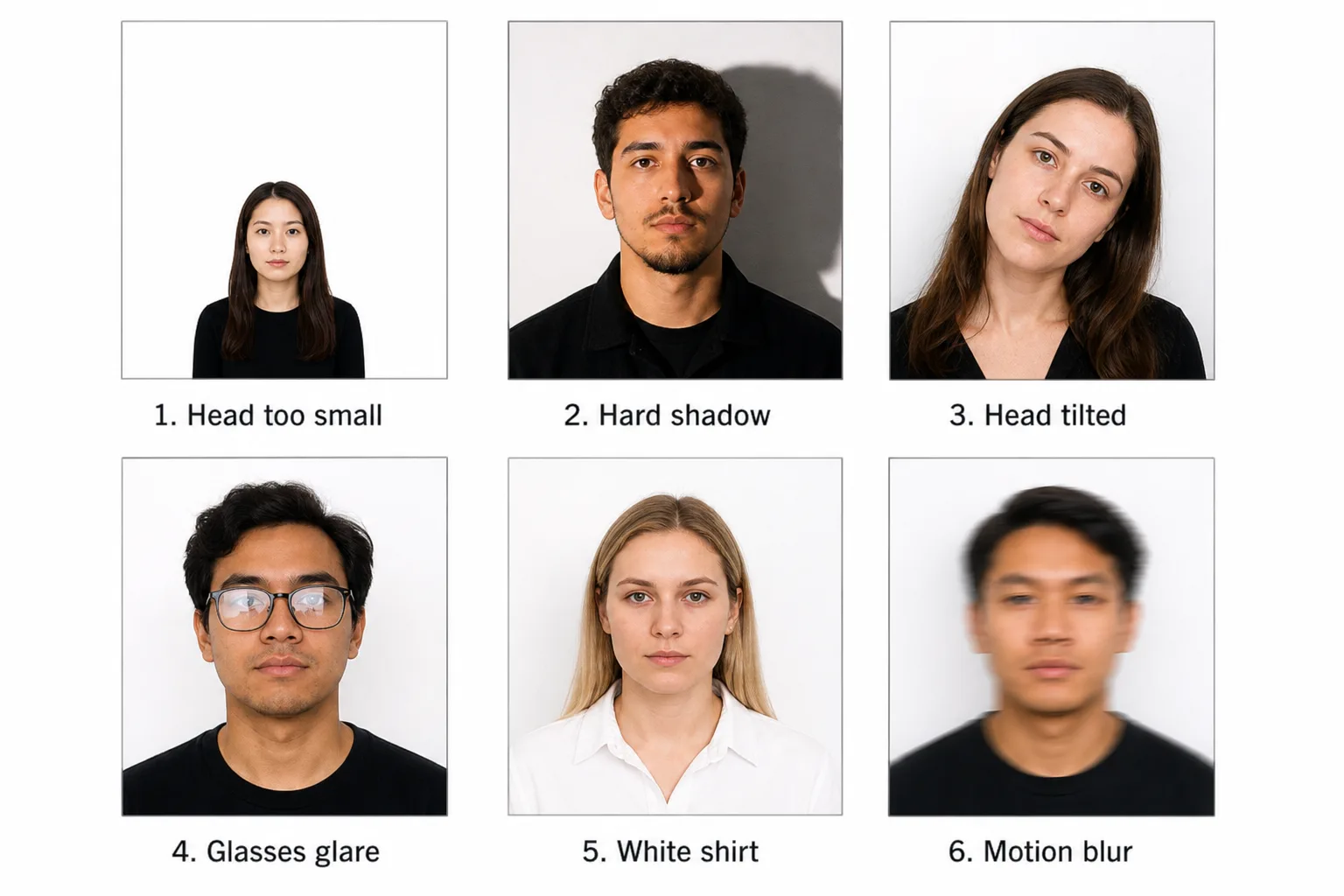
Head size / crop wrong
Too much empty space makes the face look tiny; a crop that cuts the top of the head or squeezes the shoulders looks incomplete. Leave room for the head and upper shoulders.
Size helpers (link only — no full mm/DPI chart here): US · UK · India · 2×2 · 35×45 · requirements. A better crop on a blurry or tilted source still fails — fix distance and camera height in a new capture when needed.
Busy, shadowed, or wrong-color background
Busy wallpaper, outdoor scenes, gradients, and strong shadows behind the head are frequent failures. Many countries ask for a plain, light background.
- U.S.: plain white or off-white.
- UK digital: plain light-coloured (cream / light grey often OK for print-style rules) — not always pure white. Do not force U.S. “white only” language onto a UK application.
If background alone failed and face/pose/light are already acceptable, use the passport photo white background guide — this page does not repeat that HowTo. Soft satellite: Remove Background. Background replace does not fix face shadows, tilt, closed eyes, or filter artifacts.
Shadows and uneven lighting
Harsh side light, overhead lamps, and one-sided window light create face shadows that hide features or look edited. Background replace will not fix a shadowed cheek. Retake with even light in front of you (soft daylight toward a plain wall), and inspect the full-resolution file at the face edges before upload.
Pose, tilt, eyes, expression
Expect a front-facing head, eyes open toward the camera, and an expression that matches country rules. U.S. generally allows a neutral expression or natural smile with eyes open; UK digital asks for a plain expression with the mouth closed. Tilt, closed eyes, or a dramatic expression can fail even with a perfect background. See Can you smile in a passport photo?. Camera at eye level, shoulders square, then re-check the country preset.
Glasses, glare, face coverings
Lens glare, tinted lenses, and frames that hide the eyes are common failures. U.S.: glasses generally not allowed except rare medical cases (confirm live State Department page). UK: prefer glasses off; if worn where allowed, no glare and eyes clearly visible. Hats and non-religious face coverings usually fail; religious head coverings may be allowed when the full face is visible — follow your official page. More: glasses · what to wear.
Blur, compression, screenshots, filters, “looks edited”
Soft focus, motion blur, heavy compression, screenshot chains, beauty filters, and AI reshape tools often make a photo “look edited.” Official U.S. and UK language expects an original, unedited capture. Use the original camera file — not a story export or messaging recompress. Phone tips: How to take a passport photo with iPhone. If the source is soft or filtered, retake — do not “beautify then submit.”
Retake vs edit (honesty lock)
Prefer a new source photo whenever pose, lighting, glasses, blur, or filters failed. Cropping or smoothing a weak frame often adds artifacts. Background replace and country-size crop help only when the source is already sharp, front-facing, evenly lit, and unfiltered. Fogkits does not claim to repair expression, glasses glare, or face shadows into guaranteed acceptance — fix the capture first, then use tools for size and plain background.
US digital upload vs UK digital (short contrast)
High-level contrast only — always re-read the live official page:
| Topic | United States (high level) | United Kingdom (high level) |
|---|---|---|
| Background | Plain white or off-white | Plain light-coloured (not always pure white) |
| Expression | Neutral or natural smile; eyes open | Plain expression; mouth closed |
| Glasses | Generally not allowed (rare medical exceptions) | Prefer off; no glare if worn where allowed |
| Age / freshness | Follow live digital upload rules | Digital photo typically recent — verify live GOV.UK / passport.service.gov.uk |
| Edit policy | Original unedited capture; no filters / digital changes | Unedited / no effects language on digital rules |
Fogkits country presets are helpers, not substitutes for government rules: US · UK. Official: travel.state.gov · GOV.UK.
Before you resubmit
- Confirm country and document type (passport vs visa vs national ID) — rules are not interchangeable.
- Open the live official photo page for that authority; do not rely on a third-party checklist alone.
- Inspect the full-size file at face edges, hairline, and background for shadows, blur, and crop.
- Keep the original camera file; avoid messaging-app recompress and screenshot chains.
- If background was the issue and the face is already clean, follow the white background guide after a solid source photo.
- If pose, light, glasses, or filters failed — retake before you spend time editing.
Background path: passport photo white background.
How Fogkits can help (honest)
After you know the failure mode, Passport Photo Maker helps you prepare a reviewable photo: country/size presets, background and crop assists, a free watermarked preview, and optional unmarked HD (1 credit).
Passport and background-removal flows are server-processed (upload for processing) — unlike Fogkits browser-local tools such as compress or Instagram grid. Do not mix those privacy claims onto the passport path. See Privacy.
Fogkits does not guarantee acceptance. It is not a government service and is not affiliated with the U.S. Department of State or HM Passport Office / GOV.UK. Acceptance is decided only by the issuing authority.
Background-only path: passport photo white background guide. General cutout satellite: Remove Background (free preview; HD = 1 credit).
Preview after you know what failed
Passport Photo Maker — free watermarked preview; HD = 1 credit. Background-only: passport photo white background guide. Always compare with the live official page before you submit.
- Free watermarked preview
- HD = 1 credit
- Server-processed
Background-only: passport photo white background.
Frequently asked questions
Why do passport photos get rejected?
Are bad photos a common reason applications get delayed?
Should I edit a rejected photo or take a new one?
Can a white or plain background alone fix a rejection?
Do US and UK rejection rules differ?
Will Fogkits guarantee my photo is accepted after a rejection?
Related
Prepare a reviewable photo after you understand the failure mode — or dig into background / requirements helpers.
Passport & ID Photo Maker
Country presets, free watermarked preview, HD = 1 credit.
OpenPassport photo white background
White / near-white how-to when background alone failed.
OpenPassport photo requirements
Checklist and spec helpers before you resubmit.
OpenPassport photo rejected (blog)
Shorter companion listicle — this guide is the pillar FAQ.
OpenAlso useful: smile · glasses · what to wear · iPhone · US · UK · Remove Background
Related tools
All toolsPassport & ID Photo Maker
Free passport photo maker with automatic face checks, background removal and exact-size cropping. Free watermarked preview; optional HD download uses 1 credit.
Open toolRemove Background from Image
Free background remover online. Preview a transparent PNG or white backdrop in seconds; optional HD download uses 1 credit.
Open toolCircle Crop
Circle-crop a photo into a round profile avatar PNG in your browser. Free, no upload — transparent edges by default. Not affiliated with Instagram or Discord.
Open toolOfficial sources
Fogkits prepares a crop and background to the selected preset. It does not replace the issuing authority. Requirements can change, so use the live official page as the final check.
- U.S. Passport Photos — last checked 29 October 2026.
- U.S. Uploading a Digital Photo — last checked 29 October 2026.
- GOV.UK Get a passport photo — last checked 29 October 2026.
- UK digital photo rules — last checked 29 October 2026.
- How to take a digital passport photo — last checked 29 October 2026.
Open Passport Photo Maker
Free watermarked preview; optional HD uses 1 credit. Background-only: white background guide. Not official; no acceptance guarantee — confirm live government rules for your document.