Guide · Passport cluster · Phone capture
Passport photo from your phone
You can often start from a clear phone photo — but distance, light, and a plain wall matter more than the app. Here’s how to capture a usable source photo, when a true arm’s-length selfie fails, and how Fogkits helps you preview country size and background before you spend a credit.
- Phone capture tips · selfie vs distance honesty
- Free watermarked preview for your country size
- Optional unmarked HD uses 1 credit · server-processed
Free watermarked preview; optional HD uses 1 credit. Already rejected? Why passport photos get rejected. Background-only cutout? Try Remove Background.
Quick answer
Phone is the camera — the rules are still the government’s
You can often take a passport or visa photo with a phone if the issuing office’s rules are met: plain light background, even lighting, a front-facing pose, and an original unedited file. The phone is the camera — the rules are still the government’s.
An arm’s-length selfie is a weak starting point. Camera distance of about 1.5 metres (several feet) at eye level — usually with someone else taking the photo, or a propped phone and timer — reduces facial distortion and matches common official guidance better than a close selfie. After you have a sharp front-facing phone photo, Fogkits can help you preview country size and background before you spend a credit.
Can you take a passport photo with your phone?
Many digital and at-home paths allow a smartphone capture when the photo meets official rules. High-level framing only — always re-read the live page for your document:
- United States — A friend or family member may take your photo. For online renewal, a mobile JPG, JPEG, PNG, HEIC, or HEIF in the official size range can work if the photo is recent, unedited, and follows pose and white/off-white background rules (Passport Photos, Uploading a Digital Photo).
- United Kingdom — You can take a digital photo on your own device with someone helping during the application. Booth or shop photos are marketed as more likely to be approved than a home-device photo. See Get a passport photo and How to take a digital passport photo.
- Caution: Some authorities (for example New Zealand’s passport photo guidance) say selfies are not accepted because the camera is too close. Treat “phone photo” as a capture device, not a free pass for an arm’s-length selfie.
Fogkits does not publish an acceptance rate for phone photos — use official pages as the source of truth.
Selfie vs someone else (distance honesty)
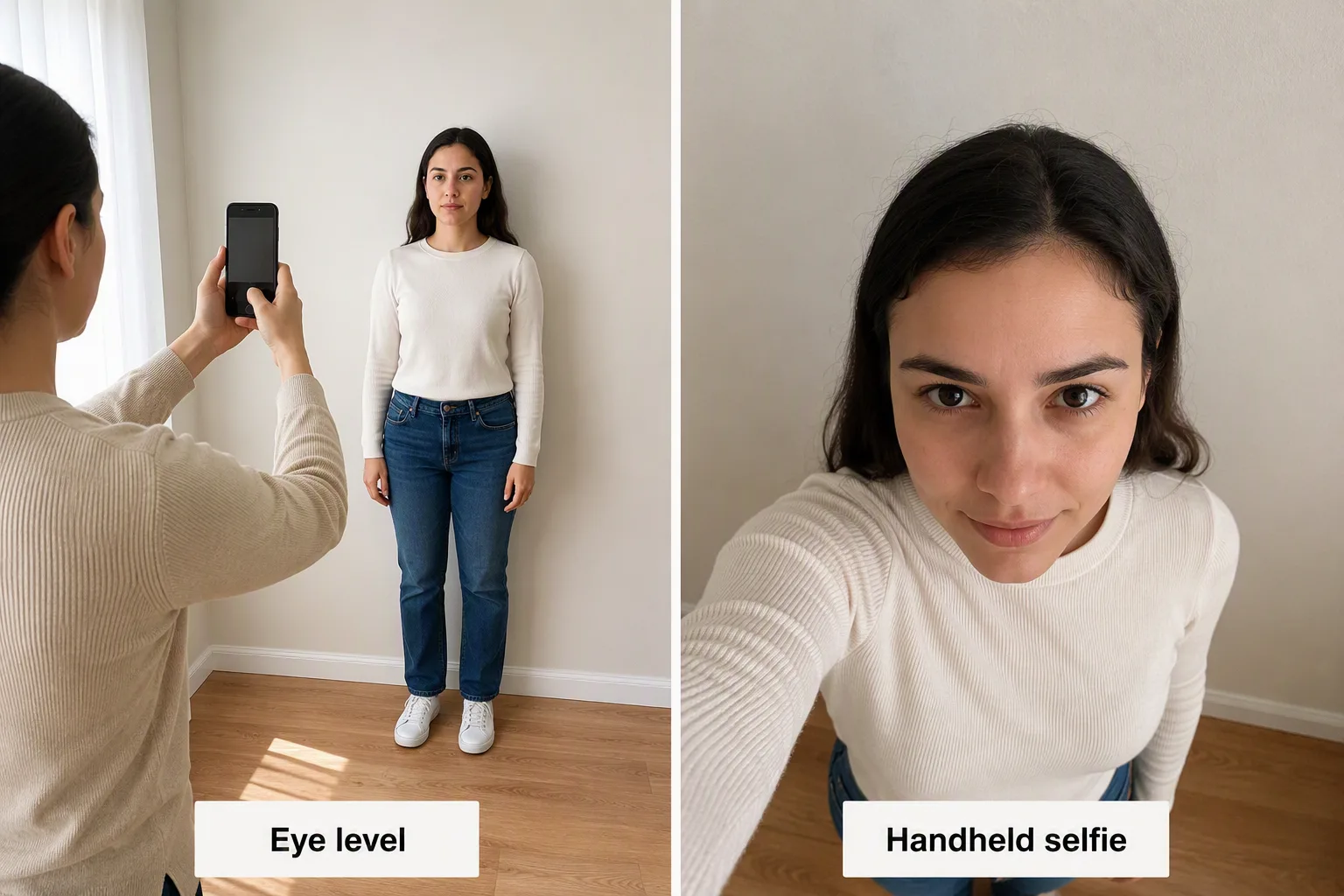
Why arm’s-length selfies fail
When the lens is too close, the nose and forehead look larger and the ears less visible. Official UK and similar guidance often asks the photographer to stand about 1.5 metres (5 feet) away, with you about 0.5 metres from the wall to reduce background shadow. U.S. digital guidance asks you to position yourself several feet from the camera with head and shoulders framed.
Better options than a close selfie:
- Ask someone else to take the photo at eye level.
- Prop the phone at eye level and use a timer or remote shutter.
- Include head, shoulders, and a little upper body — leave room above the head for later crop.
What a “good enough” source looks like
Sharp focus, even light on both sides of the face, plain wall, front-facing head, eyes open, original camera file. A clear front-facing phone photo with head and shoulders is enough to start a Fogkits preview — that is not the same as guaranteeing government acceptance.
Capture checklist for a phone passport photo
Exact rules depend on country and document — start from passport photo requirements and the live official page. Spec numbers live on country/size helpers, not as a full chart here.
Plain wall and distance from background
Stand about half a metre from a plain light wall with no objects or texture behind you.
- U.S.: plain white or off-white.
- UK digital: plain light-coloured (cream / light grey often OK) — not always pure white. Do not force U.S. “white only” language onto a UK application.
If the wall is busy and the face/pose/light are already acceptable, use the passport photo white background guide — this page does not repeat that HowTo. Soft satellite: Remove Background. Background replace does not fix face shadows, tilt, closed eyes, or filter artifacts.
Even light, no face shadows
Face a window for soft daylight. Avoid harsh side lamps and overhead light that cast shadows on the face or behind the head. Background replace will not fix a shadowed cheek — retake with even light.
Pose, expression, glasses
Expect a front-facing head, eyes open toward the camera, and an expression that matches country rules. U.S. generally allows a neutral expression or natural smile with eyes open; UK digital asks for a plain expression with the mouth closed. Glasses: follow your official page (U.S. generally glasses off; UK prefer off, no glare). More: smile · glasses · what to wear.
File quality
Use the original camera file. Do not apply beauty filters, AI reshape, or heavy retouching — official U.S. and UK language expects an unedited capture. Avoid messaging-app recompress and screenshot chains. Device tips: How to take a passport photo with iPhone.
Fogkits path
From phone photo to Fogkits preview (honest path)
Server-processed upload with a free watermarked preview first — optional unmarked HD uses 1 credit. Not browser-local; not a government service.
01
Open the Passport Photo Maker
Open the Fogkits Passport Photo Maker.
02
Pick your document / country size first
Pick your document / country size first (use the country cards or size pages linked below).
03
Upload a clear front-facing phone photo
Upload a clear front-facing phone photo with head and shoulders visible and even lighting.
04
Review the free watermarked preview
Review the free watermarked preview — check pose, crop, and background.
05
Download optional unmarked HD
If it looks right, download optional unmarked HD (uses 1 credit).
06
Compare with official guidance
Before you submit an application, compare the result with official guidance for that country. Fogkits helps you prepare a photo; it does not replace government rules.
Passport and background-removal flows are server-processed (upload for processing) — unlike Fogkits browser-local tools such as compress or Instagram grid. See Privacy.
When to retake instead of editing
Prefer a new source photo whenever pose, lighting, glasses, blur, or filters failed. Cropping or smoothing a weak frame often adds artifacts. If a photo already failed an office or upload check, read why passport photos get rejected — this page does not rewrite that checklist. Shorter companion: passport photo rejected (blog).
Country size helpers (link only — no full chart)
Link the size you need — don’t invent DPI or millimeter specs from this guide alone.
Preview your phone photo
Passport Photo Maker — free watermarked preview; HD = 1 credit. Background-only: passport photo white background. Already rejected? Why passport photos get rejected. Always compare with the live official page before you submit.
- Free watermarked preview
- HD = 1 credit
- Server-processed
Background-only: passport photo white background. Already rejected? Why passport photos get rejected.
Frequently asked questions
Can I take a passport photo with my phone?
Will a selfie work for a passport photo?
What setup makes a phone passport photo more likely to pass basic checks?
How do I turn a phone photo into a passport-size preview on Fogkits?
Is the Fogkits passport photo flow browser-local?
Will Fogkits guarantee my phone passport photo is accepted?
Related
After capture tips, prepare a reviewable country-size preview — or dig into background / rejection companions.
Passport & ID Photo Maker
Country presets, free watermarked preview, HD = 1 credit.
OpenPassport photo white background
White / near-white how-to (do not duplicate here).
OpenWhy passport photos get rejected
Companion pillar for failure modes.
OpenPassport photo with iPhone
Device-specific tips — this guide is the multi-phone pillar.
OpenAlso useful: smile · glasses · what to wear · passport photo rejected (blog) · requirements · US · UK · Remove Background
Related tools
All toolsPassport & ID Photo Maker
Free passport photo maker with automatic face checks, background removal and exact-size cropping. Free watermarked preview; optional HD download uses 1 credit.
Open toolRemove Background from Image
Free background remover online. Preview a transparent PNG or white backdrop in seconds; optional HD download uses 1 credit.
Open toolCircle Crop
Circle-crop a photo into a round profile avatar PNG in your browser. Free, no upload — transparent edges by default. Not affiliated with Instagram or Discord.
Open toolOfficial sources
Fogkits prepares a crop and background to the selected preset. It does not replace the issuing authority. Requirements can change, so use the live official page as the final check.
- U.S. Passport Photos — last checked 30 October 2026.
- U.S. Uploading a Digital Photo — last checked 30 October 2026.
- GOV.UK Get a passport photo — last checked 30 October 2026.
- How to take a digital passport photo — last checked 30 October 2026.
- NZ How to take a passport photo (selfie distance caution) — last checked 30 October 2026.
Open Passport Photo Maker
Free watermarked preview from a phone photo; optional HD uses 1 credit. Background-only: white background guide. Already rejected? Why passport photos get rejected. Not official; no acceptance guarantee — confirm live government rules for your document.